Fixing Vision Miner 22 IDEX Thermal Alignment

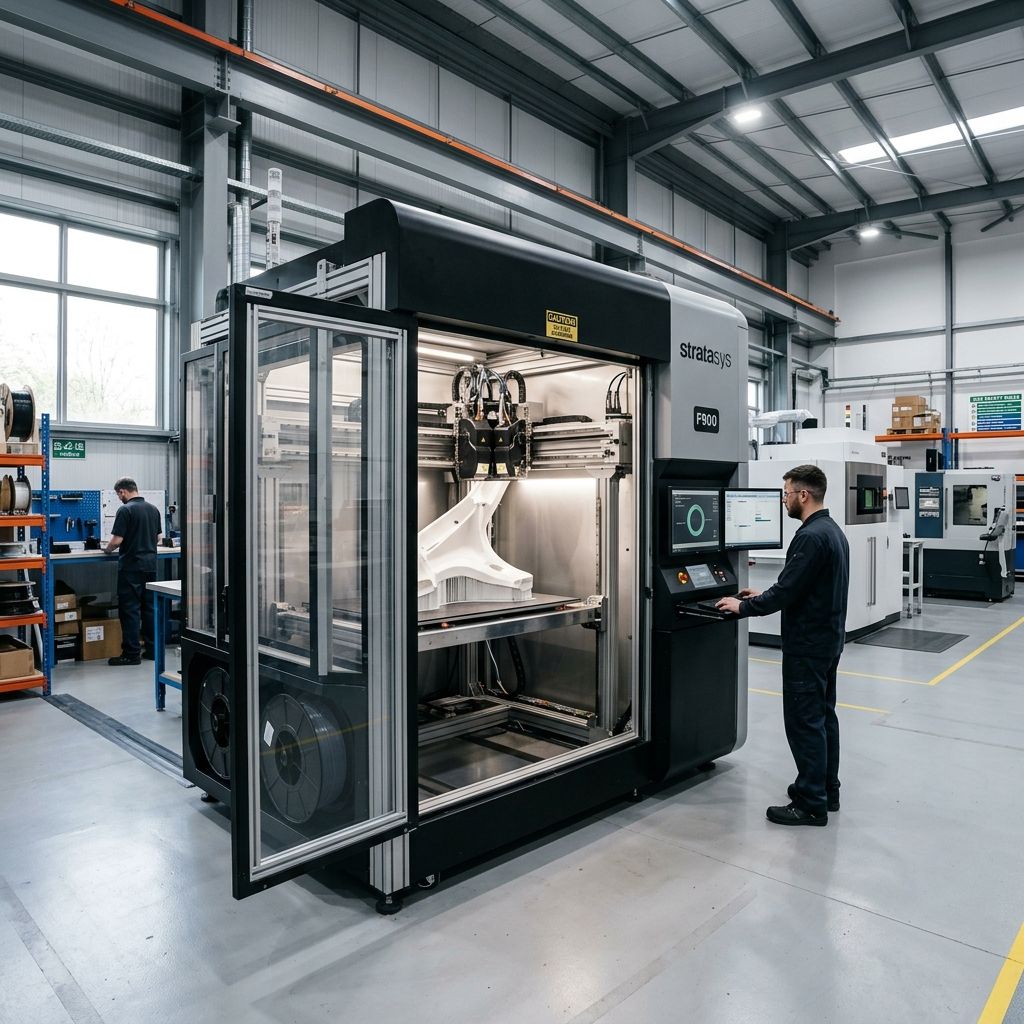
Vision Miner 22 IDEX: Industrial Troubleshooting, Thermal Physics, and Shop-Floor Fixes
An unvarnished engineering breakdown of the thermal, mechanical, and extrusion realities of running high-performance polymers on the Vision Miner 22 IDEX.
Executive Specifications & Operational Envelope
The Vision Miner 22 IDEX is designed for ultra-high-performance polymers like PEEK, PEKK, ULTEM (PEI), and PPSU. Safely operating this machine requires managing extreme thermal gradients. If you are tuning print speeds for these high-viscosity materials, consider using our Print Speed Calculator to prevent extruder skipping and optimize material deposition.
- Maximum Hotend Temp: 500°C (liquid-cooled or high-airflow heat breaks)
- Chamber Heating: Active convection heating up to 100°C+
- Drive System: Precision ground ball screws and linear guide rails
- Extrusion Architecture: Independent Dual Extruders (IDEX) with hardened steel drive gears
The Reality of High-Chamber IDEX Printing
Running high-performance polymers is not like printing carbon-fiber PLA on a desktop machine. On paper, the Vision Miner 22 IDEX promises dual-material high-temperature prints such as PEEK with breakaway support. In the workshop, however, managing two independent heads at 450°C inside a 100°C actively heated chamber is a constant battle against thermal expansion, heat creep, and calibration drift.
If you don't account for how metal behaves when soaked at these temperatures, you will end up with layer shifts, sheared nozzles, and expensive scrap. Below is a deep dive into the top three failure modes we encounter on the shop floor, how to diagnose them, and the engineering workflows required to keep these machines running reliably.
Failure Mode 1: High-Chamber Thermal Drift & IDEX Alignment
The single greatest headache with any high-temperature IDEX setup is thermal expansion. When you heat the chamber of the Vision Miner 22 from a cold shop temperature (20°C) to its operational temperature (90°C to 100°C), every metal component inside the enclosure expands. This includes the aluminum frame, the steel linear rails, and the carriage assemblies holding the two independent extruders.
If you calibrate your toolhead offsets (the X, Y, and Z distance between Toolhead 1 and Toolhead 2) when the machine is cold, those offsets will be completely wrong by the time the chamber reaches thermal equilibrium. This results in dual-material prints with severe layer alignment issues or active nozzles scraping across previously printed layers.
The Physics of Thermal Expansion
To understand why this happens, we must look at the linear thermal expansion of the gantry components. Let us calculate the expansion of a 600 mm aluminum gantry member when heated from room temperature to chamber operating temperature.
The formula for linear thermal expansion is:
$$\Delta L = \alpha \cdot L_0 \cdot \Delta T$$
Where:
- $\Delta L$ is the change in length (mm).
- $\alpha$ is the coefficient of linear thermal expansion. For 6061-T6 Aluminum, $\alpha \approx 23 \times 10^{-6} \text{ K}^{-1}$ (or $\text{mm/mm}^\circ\text{C}$).
- $L_0$ is the initial length of the gantry member ($600 \text{ mm}$).
- $\Delta T$ is the change in temperature ($100^\circ\text{C} - 20^\circ\text{C} = 80^\circ\text{C}$).
Calculating the expansion:
$$\Delta L = (23 \times 10^{-6}) \cdot 600 \cdot 80$$
$$\Delta L = 0.000023 \cdot 48000 = 1.104 \text{ mm}$$
An expansion of over **1.1 mm** along the X-axis is massive when you are trying to print with a 0.4 mm nozzle and a layer height of 0.15 mm. Even if the linear guide rails are made of stainless steel ($\alpha \approx 16 \times 10^{-6}$), they will still expand by approximately **0.77 mm**. Because the two toolheads park on opposite sides of the gantry, this expansion is not symmetrical. It changes the physical distance between the home positions and the active printing zone, causing toolhead offsets to drift dynamically as the machine heats up.
The Hot-Calibration Protocol
To resolve this drift, you must perform your calibration under full thermal load. Never trust a cold calibration on an industrial machine. Follow this workflow:
- Thermal Soak: Heat the bed to your target temperature (e.g., 150°C), the chamber to its target (e.g., 90°C), and both hotends to 250°C. Let the entire machine sit closed for at least 45 to 60 minutes. This allows the internal frame, rails, and toolheads to reach thermal equilibrium (thermal soak).
- Nozzle Cleaning: Ensure both nozzle tips are completely free of plastic. Any hardened filament on the tip of either nozzle will throw off your Z-height probing. Use a brass wire brush while the nozzles are hot.
- Run Z-Offset Calibration: Calibrate the relative Z-height between Toolhead 1 and Toolhead 2. Toolhead 2 must be mechanically adjusted or offset in software so that both nozzles are perfectly coplanar relative to the bed at printing temperature.
- Print an XY Offset Test: Print a vernier-style alignment pattern using both extruders. Inspect the alignment under magnification. Adjust your toolhead offsets in the machine's firmware based on the hot-printed results, not cold manual measurements.
Failure Mode 2: Heat Creep and Drive Gear Wear with Filled Materials
When printing high-temperature, high-strength polymers like CF-PEEK (Carbon Fiber Reinforced Polyetheretherketone), the extruder assembly must handle two opposing thermal requirements. It must heat the nozzle to 400°C+ while keeping the cold end (where the filament enters the drive gears) cool enough to prevent the filament from softening prematurely.
In high-ambient chambers, this cooling is difficult. If the chamber air is 100°C, cooling the heat break with a standard fan is highly inefficient. If the cold end temperature rises above the glass transition temperature ($T_g$) of the polymer (which is around 143°C for PEEK, but only 45°C for some support materials), the filament will soften inside the drive gears. This causes the gears to grind into the filament, resulting in under-extrusion or a total jam.
For comparative context on handling temperamental high-temp setups, you can read about our experiences with other high-temperature platforms in X1-Carbon/X1E High-Temp Material Fixes.
Drive Gear Abrasive Wear
Additionally, materials like CF-PEEK contain highly abrasive carbon fibers. Standard brass or stainless steel drive gears will wear down within a few kilograms of printing. As the teeth of the drive gears wear down, they lose their bite, slip on the filament, and cause extrusion failures.
- Hardened Steel Gear Lifespan: ~150 to 200 hours of CF-PEEK printing before inspection is required.
- Drive Gear Tension: Must be set via spring-tension screw to provide high grip pressure without flattening the filament.
- Liquid Cooling Loop Maintenance: Inspect cooling lines every 500 hours for kinking or air bubbles.
- Heat Break Tolerance: Must be kept polished and free of carbon residue to prevent material stagnation.
Step-by-Step Extruder De-clogging and Gear Maintenance
If you experience a heat-creep jam or slip while printing high-temp materials, standard cold-pull techniques using PLA will not work. You need a dedicated high-temperature purge procedure:
- Raise the Temperature: Heat the affected toolhead to 400°C. This is hot enough to melt any jammed PEEK or ULTEM.
- Manual Purge: Release the extruder tension arm. Using a piece of high-temperature purging filament (or a clean, dry piece of unfilled PEEK), manually push the filament through the hotend. If it does not push through easily, the jam is located in the heat break.
- Clear the Heat Break: If the filament is jammed in the heat break, lower the hotend temperature to 150°C. Remove the liquid-cooling block or heat sink shroud. Use a clean brass rod (sized to match the filament path, typically 1.5 mm for 1.75 mm systems) to push the softened plug down through the nozzle. Do not use steel drill bits, as they will scratch the interior walls of the heat break, leading to permanent jamming points.
- Inspect and Clean the Drive Gears: Open the extruder housing. Use a brass wire brush and compressed air to clean out any ground plastic dust from the hardened steel drive teeth. Inspect the teeth under a magnifying glass. If the sharp profiles of the teeth look rounded or shiny, replace the drive gears immediately.
Failure Mode 3: Bed Adhesion and Vacuum Plate Failures
PEEK and ULTEM have high shrinkage rates (often around 1.5% to 2% upon cooling). When printing large parts, the cooling contraction forces are strong enough to warp the build plate, pull the print off the bed, or even chip pieces of glass out of a solid build surface.
The Vision Miner 22 often utilizes a high-temperature glass or ceramic bed surface coated with a specialized liquid adhesive (like Vision Miner Nano Polymer Adhesive) or a high-temperature vacuum bed system with consumable polymer sheets. At 150°C+ bed temperatures, several issues can occur:
- Vacuum Seal Degradation: If the machine uses a vacuum plate, the high-temperature Viton or silicone seals underneath the plate will eventually dry out, crack, and lose vacuum pressure during a long print, leading to bed lifting.
- Adhesive Boiling: Applying liquid adhesive too thickly can cause it to bubble and boil at high temperatures, creating air pockets underneath the print that lead to localized warping.
- Bed Plate Warping: Even thick aluminum tooling plates can warp under the stress of a large PEEK print cooling down.
The Warping Force Equation
The mechanical stress ($S$) generated in a printed part due to thermal contraction can be estimated by:
$$S = E \cdot \alpha \cdot \Delta T$$
Where:
- $E$ is the Young's Modulus of the material (for PEEK, $E \approx 3.76 \text{ GPa}$ or $3760 \text{ MPa}$).
- $\alpha$ is the coefficient of thermal expansion (for PEEK, $\alpha \approx 55 \times 10^{-6} \text{ K}^{-1}$ below its glass transition temperature).
- $\Delta T$ is the temperature drop from the crystallization temperature to the bed/chamber temperature (approx. $340^\circ\text{C} - 150^\circ\text{C} = 190^\circ\text{C}$).
Calculating the internal stress:
$$S = 3760 \cdot (55 \times 10^{-6}) \cdot 190$$
$$\S = 3760 \cdot 0.01045 \approx 39.3 \text{ MPa}$$
This internal stress of **39.3 MPa** is a massive force pulling up on the edges of the print. If your bed adhesive or vacuum hold-down cannot withstand this shear stress, the part will lift, ruin your first layer, or pull the bed plate out of flat. If your print begins to shift or lift during print movement, check your slicer's acceleration settings. High acceleration combined with warping forces is a common cause of layer shifts, which you can read about in Fixing Layer Shift in Simplify3D: Acceleration Settings.
Bed Prep and Adhesion Optimization
To prevent adhesion failures and bed damage on long prints, follow these guidelines:
- Apply Adhesive Thinly and Evenly: When using Nano Polymer Adhesive on glass or PEI, apply a few drops and spread them with a damp, lint-free microfiber cloth. The goal is a molecularly thin, uniform layer. A thick layer will bubble and peel off the glass under the extreme thermal load of a PEEK print.
- Verify Vacuum Pressure: If using a vacuum bed system, verify that the vacuum pump maintains at least -0.8 bar of pressure. Check the vacuum hose lines inside the chamber for signs of heat degradation or cracking. Replace standard silicone hoses with high-temperature PTFE or braided stainless steel lines.
- Chamber Thermal Ramp-Down: Never open the chamber door immediately after a print finishes. The sudden thermal shock will cause the PEEK part to contract rapidly, either warping the part or shattering the glass bed. Program a slow cool-down ramp in your slicer: lower the chamber temperature by 10°C every 15 minutes until it reaches room temperature.
Component Maintenance Schedules
Because the Vision Miner 22 IDEX operates under extreme thermal conditions, preventative maintenance intervals are much shorter than those of standard desktop 3D printers. Components age faster when subjected to continuous 100°C ambient temperatures.
- Gantry Guide Rail Lubrication: Use high-temperature fluorinated grease (Krytox GPL 205 or equivalent). Apply every 100 hours of chamber heating. Avoid standard lithium grease, which dries out and cakes at high temperatures.
- IDEX Drive Belt Tension: Check belt tension every 150 printing hours. High chamber heat causes belts to stretch. Adjust to 75-85 Hz using a belt tension analyzer.
- Cooling System Flush: For liquid-cooled hotends, flush the coolant and replace it with a high-temperature corrosion-inhibited glycol mix every 1000 hours of operation.
- Nozzle Inspection: Check nozzle orifice wear every 50 hours of printing with carbon-fiber or glass-fiber filled filaments. Hardened steel nozzles wear slower but will eventually blow out.
Comprehensive Troubleshooting Matrix
This matrix covers common issues encountered on the Vision Miner 22 IDEX, ranging from initial setup calibration errors to long-term wear from thermal stress.
| Symptom | Root Cause | Diagnostic Step | Corrective Action |
|---|---|---|---|
| X/Y Layer Shift on Toolhead 2 only | Loose belt or loose stepper motor pulley on the secondary gantry drive. | Check belt tension on Toolhead 2's drive loop. Check the set screws on the stepper motor drive pulley. | Tighten the pulley set screws onto the flat of the motor shaft. Re-tension the belt to 80 Hz. |
| Dual-material prints have gaps between the model and support material | Incorrect XY offsets or incorrect filament retraction/priming settings. | Print a dual-extruder calibration square. Check if the gap is uniform or directional. | Adjust the toolhead offset in firmware. Increase toolhead priming volume after a tool change to ensure the nozzle is pressurized before printing the support interface. |
| Filament grinding shortly after print starts | Heat creep in the cold end or restricted path in the heat break. | Measure the temperature of the heat sink body. Check if the hotend liquid cooling pump is running. | Verify water pump flow. Clear the heat break of any debris. Replace the heat break if the inner PTFE liner (if equipped) has degraded. |
| First layer lifts or warps at corners on ULTEM/PEEK prints | Insufficient bed temperature, uneven adhesive application, or drafted air inside the chamber. | Check actual bed temperature with an external IR thermometer. Verify that chamber fans are operating and distributing air evenly. | Increase bed temperature by 5-10°C. Reapply Nano Polymer Adhesive in a thin, wet coat. Check the door seals for air leaks. |
| Nozzle dragging across printed parts | Bed leveling drift due to thermal expansion of the bed mounts, or Z-axis ball screw backlash. | Run a multi-point mesh bed leveling cycle while the bed is hot. Check the Z-axis coupler for slop. | Allow the bed to heat soak for 45 minutes before leveling. Tighten the Z-axis lead screw nut or replace the spring-loaded anti-backlash nut. |
Frequently Asked Questions
Why does my IDEX offset drift during a 20-hour print?
This is almost always caused by the chamber temperature slowly climbing beyond the point of initial calibration, or by heat soaking into the gantry frame and causing the stepper motor mounts to expand. Ensure your chamber is fully heat-soaked for at least one hour before starting the print, and verify that your stepper motor cooling fans are operational to prevent the motors from transferring heat to the belts and gantry.
How often should I rebuild the high-temperature hotends?
If you are printing PEEK or ULTEM continuously, you should inspect and rebuild the hotend every 250 to 300 printing hours. High-temperature materials can degrade inside the threads of the nozzle and heat break over time, creating a burnt carbon layer that causes flow restriction and under-extrusion.
Can I print standard PLA or PETG on the Vision Miner 22 IDEX?
Yes, but you must turn off the chamber heaters and leave the chamber doors open. Printing low-temperature materials inside a closed chamber designed for high-temp polymers will cause immediate heat creep and jam the extruders, as these materials have very low glass transition temperatures.
Why is my vacuum bed plate losing suction mid-print?
The high-temperature silicone or Viton gasket underneath the plate degrades and hardens over time when exposed to temperatures above 140°C. Inspect the gasket for cracks or loss of elasticity every 200 printing hours, and replace it as soon as it feels brittle or compressed.
Related Intel
Modix BIG-120X V3: Bed Warp and Gantry Fixes
The Modix BIG-120X V3 has two main issues: thermal bed warp exceeding 1.5mm due to constrained expansion of the aluminum plate, and gantry binding from improper alignment. This guide shows how to fix each with dial indicators and config changes.
Markforged Mark Two & Onyx One Troubleshooting
The Markforged Mark Two and Onyx One require manual calibration for kinematic drift, continuous fiber jamming, and abrasive extruder wear. This guide covers diagnosing fiber buckling, cutter assembly issues, and maintaining tight tolerances.
Fixing Common UltiMaker Method XL Problems
Heat creep is the main cause of jamming in the Method XL's Smart Extruder. Ensure the heat break cooling fan pulls ambient air below 80°C by maintaining hotend fan shroud seals and pre-drying filaments like PVA to keep cold block below glass transition temperature.